回回部落格

How to Translate a Screenshot

Translate app screens, chats, websites, games, documents, and dashboards while keeping interface context visible.

2026年8月13日ImageWise TeamImageWise Team
How to Translate a Screenshot

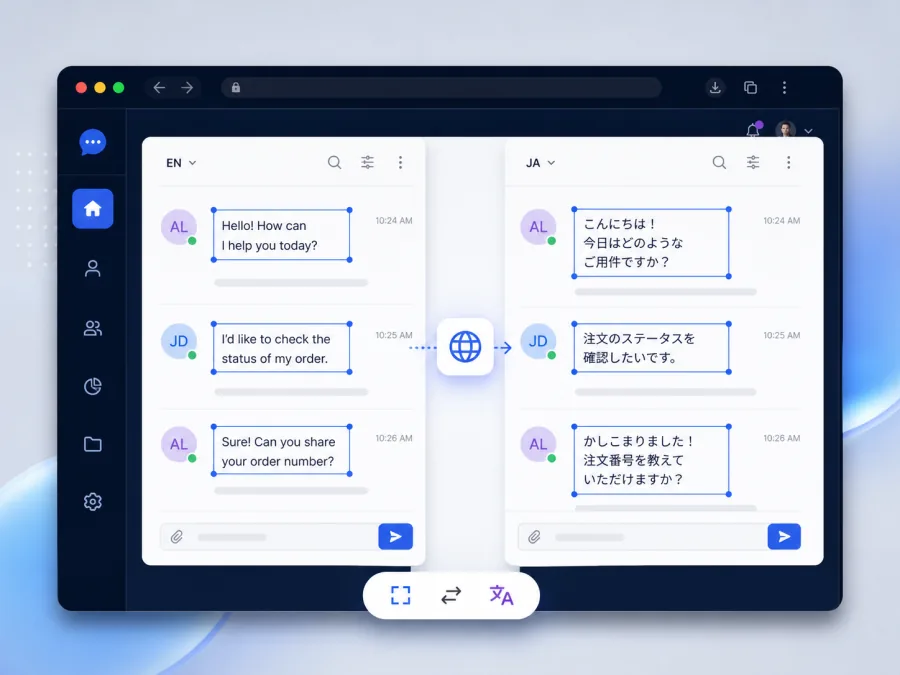
A screenshot translator is useful when text cannot be selected: mobile apps, games, chat messages, remote desktops, scanned documents, or websites rendered as images. Keeping the translation inside the screenshot also makes it easier to understand which phrase belongs to which button or field.

Capture at native resolution

Take the screenshot on the original device instead of photographing the screen. PNG is usually a strong choice for interface text because it avoids the artifacts introduced by aggressive JPEG compression.

Remove unrelated or sensitive areas

Crop away browser tabs, notifications, account details, and empty space when they are not needed. Never upload passwords, one-time codes, private keys, financial information, or confidential conversations to an online translation service.

Use automatic detection carefully

Automatic source detection works well for many screenshots. Select a language manually when the screen has only one or two short labels, mixes scripts, or includes many brand and product names.

Translate and preserve context

Upload the file to the Screenshot Translator, choose the target language, and process it. The output image keeps the interface visible while placing translated wording back into corresponding regions.

Review compact interface text

Buttons and navigation items have strict space limits. Check truncated labels, numbers, keyboard shortcuts, error codes, and text close to icons. A slightly shorter translation may communicate better than a literal one in a narrow control.

Keep the source for reference

Save both versions. The translated screenshot helps you navigate or explain the screen, while the original provides an exact reference for troubleshooting and support.

Translate a screenshot online

For language-specific workflows, try Japanese to English, Chinese to English, or Korean to English.