7 Ways to Localize Visual Content for Global Audiences
Learn a practical seven-step workflow for localizing images, screenshots, product graphics, and campaigns while protecting layout, meaning, and brand consistency.
 ImageWise Team
Translating a webpage is only part of international expansion. Product graphics, screenshots, menus, labels, infographics, and social posts often contain the information that persuades a customer to act. If those assets remain in the source language—or return from translation with broken layouts—the experience still feels unfinished.
Visual localization combines language work with design decisions. Text must remain attached to the correct region, longer translations must fit, local formats must be accurate, and brand elements must survive the process. The following seven-step workflow is designed for teams that need reusable, publish-ready images rather than a temporary translation overlay.
Quick comparison
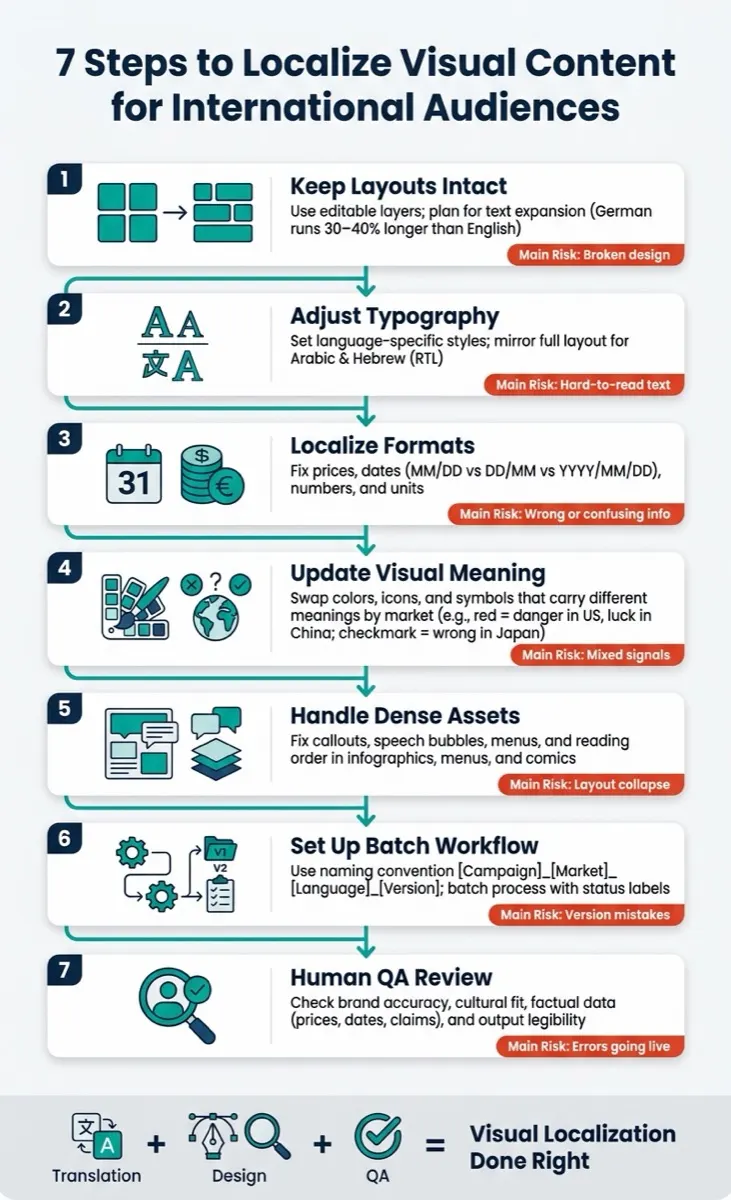
| Step | What to check | Common failure |
|---|---|---|
| 1. Preserve layout | Regions, alignment, hierarchy | Translated text shifts or covers the subject |
| 2. Adapt typography | Length, direction, font support | Overflow, missing glyphs, or incorrect reading order |
| 3. Localize formats | Dates, prices, numbers, units | Correct words paired with misleading data |
| 4. Review visual meaning | Symbols, colors, references | A familiar cue becomes unclear in another market |
| 5. Handle complex assets | Tables, menus, comics, diagrams | Reading order or labels become disconnected |
| 6. Build a repeatable workflow | Naming, glossary, batch settings | Inconsistent results across a campaign |
| 7. Add human QA | Meaning, layout, claims, export | A technically complete image is still unsafe to publish |
Why visual localization fails more often than text translation
Image translation is a chain of separate tasks: OCR, reading-order detection, translation, text fitting, background cleanup, rendering, and quality review. A failure anywhere in that chain can make the final image unusable even when every sentence is translated correctly.
Visual assets also have less room for error. A product label may allow only two short lines. A screenshot may contain twenty small interface strings. A promotional banner may depend on a carefully balanced headline. Treating every detected line as plain text ignores the design that gives it meaning.
1. Preserve the original layout and text regions
Start by identifying which text belongs to which visual area. Translation data should remain connected to the source region so a headline does not replace a caption and a price does not move into the wrong product card.
For flattened images, a region-aware workflow is more reliable than copying extracted text into a separate document. ImageWise's AI Image Translator is designed to keep translated content associated with detected image regions while using the original image as the visual reference. Always inspect the side-by-side result, especially around logos, faces, product edges, icons, and small labels.
When the source is a software interface or a mobile capture, use the Screenshot Translator so compact UI regions receive extra attention. Preserve untranslatable items such as brand names, model numbers, legal marks, and product codes in the instructions.
2. Adapt typography, reading direction, and text density
Translations rarely occupy the same amount of space. A short source phrase may expand substantially, while another may become more compact. The correct response is not always to shrink the font: shorter localized copy, adjusted line breaks, or a slightly wider text region can produce a clearer result.
Typography review should cover:
- Supported glyphs and a suitable fallback font.
- Line breaks that preserve the intended emphasis.
- Alignment and reading order for right-to-left languages.
- Minimum readable size at the asset's real display dimensions.
- Consistent weight, color, and contrast across the campaign.
For bidirectional text, follow the W3C guidance for authoring HTML with right-to-left text when the image is paired with web content. Do not mirror every visual element automatically: products, logos, diagrams, and directional symbols need case-by-case review.
3. Localize prices, dates, numbers, and units
Accurate sentence translation does not guarantee accurate locale formatting. Decimal separators, currency placement, date order, measurement systems, and plural rules vary by market. A price such as 1,299.50 can be read differently depending on locale, and a date such as 03/04/2026 is inherently ambiguous without context.
Use the target market's approved product data rather than asking an image model to infer conversions. Keep a structured source of truth for:
- Currency and tax presentation.
- Date and time formats.
- Decimal and grouping separators.
- Metric or imperial measurements.
- Phone numbers, addresses, and support hours.
Unicode's Common Locale Data Repository is a useful reference for locale conventions, but business, legal, and platform requirements must still be verified locally.
4. Review colors, symbols, and cultural references
Color and symbol meaning is contextual, not universal. A checkmark, hand gesture, animal, holiday reference, or color combination may be understood differently across regions. Avoid rigid rules such as “this color always means X.” Instead, validate the specific asset with a reviewer who understands the target audience and the campaign context.
Separate elements into three groups:
- Brand constants: logo, core palette, product appearance, and protected marks.
- Market variables: currency, language, offers, dates, contact details, and regulated claims.
- Review-required visuals: gestures, humor, maps, flags, religious references, and locally sensitive imagery.
This classification prevents unnecessary redesign while identifying the parts most likely to need a market-specific version.
5. Give complex assets their own workflow
Dense assets need more than a one-click text swap. Menus depend on row alignment and prices. Infographics depend on label-to-chart relationships. Comics require speech-bubble reading order. Product comparison tables must keep every value under the correct heading.
Use the appropriate focused workflow when possible:
- Product Image Translator for ecommerce callouts, packaging, and feature graphics.
- Label Translator for labels and packaging text.
- Batch Image Translator for a campaign or catalog.
- Manga Translator for speech bubbles and irregular panels.
For important tables, prices, or regulated statements, compare each translated item against the source rather than approving the asset by appearance alone.
6. Build a repeatable multi-image workflow
Localization quality becomes harder to manage as the image count grows. Before processing a campaign, define a small localization brief: target locale, tone, protected terms, preferred translations, units, and items that must not change.
A practical batch workflow looks like this:
- Keep the highest-resolution source files.
- Use predictable names that include market and version.
- Prepare a glossary for brand and product terminology.
- Process a representative test set first.
- Apply the approved settings to the remaining assets.
- Resize and convert only after the localized master is approved.
ImageWise includes an Image Resizer and Image Converter for final delivery formats. Keeping translation and delivery-format changes as separate stages makes quality problems easier to trace.
7. Add human review before publication
AI can reduce repetitive work, but it should not be the final authority for high-impact visuals. Review the output at full resolution and at the size customers will actually see. A line that looks acceptable on a desktop preview may become unreadable in a mobile product card.
Use a four-part approval check:
- Language: Is the meaning natural and complete?
- Visual: Does the translated text fit without changing important artwork?
- Data: Are prices, dates, units, product names, and claims correct?
- Delivery: Is the file sharp, correctly sized, and exported in the required format?
Have a native or professionally qualified reviewer check customer-facing campaigns, regulated content, safety instructions, and legal claims. Keep the original and localized assets together so changes can be audited later.
How AI can speed up visual localization
AI is most useful when it removes mechanical work while leaving judgment visible. OCR can locate text, translation models can produce compact target copy, and reconstruction tools can repair the background and blend the new wording into the design. The user should still be able to compare the original and result and choose a faster or higher-fidelity workflow based on the asset.
For a deeper explanation of the translation pipeline, read How to Translate Text in Images Without Losing the Design. If you are preparing ecommerce material, see the dedicated product-image localization workflow.
Final checklist
Before publishing a localized image, confirm that:
- Every visible source-language phrase was intentionally translated or preserved.
- Translation regions still correspond to the correct objects and labels.
- Brand names, product codes, and protected marks remain unchanged.
- Dates, currencies, units, and numerical values were verified.
- Text remains readable on mobile and at the final placement size.
- No product, logo, face, icon, or background detail changed unintentionally.
- A human reviewer approved high-risk or customer-facing content.
Visual localization works best as a controlled production process, not a final-minute text replacement. Start with one representative asset, establish the rules, and then scale the approved workflow across the campaign.
Translate an image with ImageWise.ai and review the result beside the original before downloading it.